

Musubi: building Shopify's smoothest features into WooCommerce, without the subscriptions
Scope: Brand identity, WooCommerce build, custom plugin development, product data and imagery, hosting, staff training
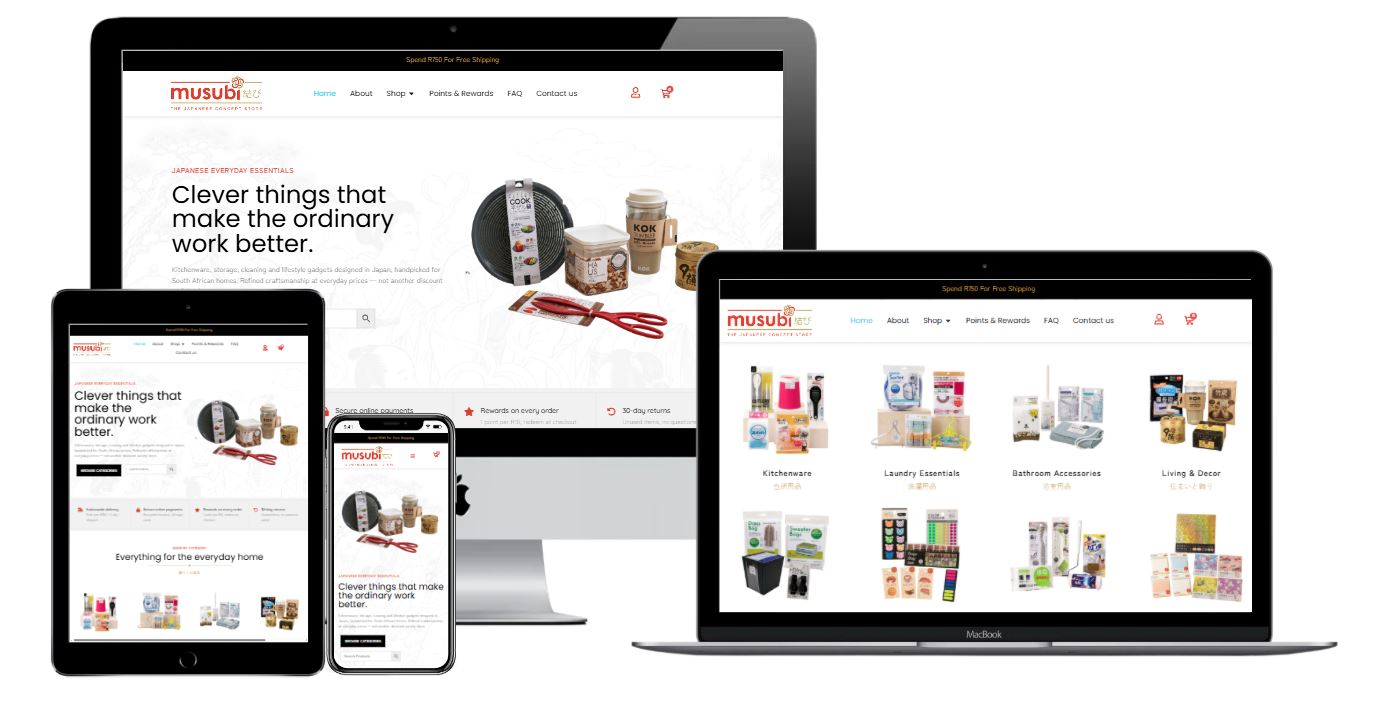
Musubi came to us with an idea and a few stores they liked the look of. No website, no brand, no product data. The idea was to bring the clever, well-made household goods you find in any Tokyo home to South African kitchens, at prices that work for a normal weekly shop.
Two months later they were live with over 500 products, a points programme we wrote ourselves, and a checkout that behaves like Shopify while running on WooCommerce.
Here is how it was built, and why we wrote the code instead of buying it.
What they actually asked for
The reference stores Daigo Yamamoto and Palisa showed us were mostly Shopify. That turned out to matter more than the visual side.
Shoppers are used to Shopify checkouts now, and they expect certain things without thinking about it. A bar telling you how close you are to free delivery. A points balance in the header. Search that finds products as you type. A delivery date rather than a vague promise. Filters that do not reload the page.
None of that comes standard with WooCommerce. All of it can be bought as a plugin, and most of those plugins renew every year.
So the first job was working out which of those features are worth having, and the second was building them without signing Musubi up to a stack of subscriptions.
"We are not fans of the vendor lock-in that comes with Shopify. You are renting your own store, and the day you want to leave, leaving is the hard part. What Shopify does get right is the buying experience. It is smooth and shoppers trust it.
WooCommerce gives you the opposite trade-off. You own everything and you can build whatever you want, but none of that polish is there out of the box.
So we took the parts of Shopify we liked and built them into WooCommerce ourselves. Musubi gets the experience, and they still own the shop."
Why we built the points system instead of buying one
Musubi wanted a rewards programme: earn on every order, redeem at checkout, expire after twelve months.
That is a solved problem in WooCommerce. There are several mature plugins that do it. We priced two of the leading options.
That is for functionality that amounts to adding numbers to a database and subtracting them at checkout.
We built it in-house instead. Here is what that actually bought Musubi beyond the licence saving.
Only the features they asked for
Commercial rewards plugins have to serve every store on earth. That means birthday points, referral tiers, social sharing bonuses, MLM-style downlines, and settings screens that run to dozens of fields. Musubi needed four things: an earning rate, a redemption value, a minimum threshold and an expiry period.
Our plugin has one settings tab. Everything on it is something Musubi uses.
Support comes from us, not a ticket queue
If something breaks on a third-party plugin, Musubi logs a ticket with a vendor in another timezone and waits. If something breaks on ours, they message us and it gets fixed, inside their existing hosting arrangement.
That matters more than it sounds. The points system touches the cart, the checkout and the order lifecycle. It is not a feature you want stuck in a support queue during a trading week.
We control the patch cycle
When a widely used WordPress plugin has a vulnerability disclosed, the exploit gets weaponised and scanned for at scale within days. Automated attacks work through a dictionary of known plugin paths and version numbers, hitting thousands of sites an hour.
Custom code is not in that dictionary. Nothing here is unhackable, and we would never claim otherwise, but an attacker would have to come to this specific site and probe this specific code deliberately. That is a materially different threat profile to being one of forty thousand installs of a plugin with a published CVE.
We also patch on our schedule rather than waiting for a vendor release.

What the points system actually does
The mechanics are simple by design. Customers earn 1 point per R10 spent, each point is worth R0.10, and points last twelve months.
The engineering underneath is less simple.
Expiry runs per batch, not per account
Points earned in March expire the following March. Points earned in June expire the following June. When someone redeems, the system spends their oldest points first, so nothing expires that could have been used. A single account-wide expiry date would have been far easier to build and would have quietly cost customers points they had earned.
Guest checkout still earns
Points from guest orders are held against the billing email address. The moment that email registers or logs in, the balance attaches to the account automatically. No support ticket, no manual adjustment. The order confirmation email tells the customer points are waiting, which is a better reason to create an account than a generic newsletter prompt.
Refunds reverse cleanly
Refund an order and the points it earned are clawed back. Points that were spent on that order are returned to the customer. Both directions, automatically, without anyone in the warehouse having to remember.
Everything is a ledger entry
Every credit, debit, expiry and reversal is a row in a table. Musubi's admin can see the total outstanding points across all customers and, more usefully, what that represents as a rand liability on the balance sheet.

The free delivery progress bar
This is a small thing that does real work.
Musubi ships free on orders over R750. Before, that was a line of text in the announcement bar. Now the cart shows a progress bar and a specific number: spend R120 more for free delivery.
The detail that matters is what the bar measures. It uses the cart subtotal after discounts, excluding shipping, which is exactly how WooCommerce's own free shipping method decides whether to apply. Plenty of implementations measure the wrong total and end up promising free delivery that the checkout then refuses. Ours cannot get out of step with the shipping rule, because it reads the same figure.
When a customer applies a coupon that drops them below the threshold, the bar updates immediately and tells them so.

Product search that works while you type
WooCommerce ships with WordPress search, which was built for blog posts. It matches on title and content, ignores product attributes, returns results in a full page reload, and on a 500-product catalogue it is close to useless.
Every store with a decent catalogue ends up needing live search. It is another thing you can buy, and another annual renewal.
We built it. Type into the header search and results appear underneath as you go, with a thumbnail, the product name, the price and the category, so you can tell a ceramic bowl from a plastic one without opening either.
The parts that took the work:
- Results are debounced, so it waits for a pause in typing instead of firing a request per keystroke
- It searches product titles, SKUs and categories rather than just post content
- Out of stock products still appear, marked as such, rather than vanishing and making people think the store does not carry them
- On mobile it opens full screen, because a dropdown under a search field is unusable on a phone
Search is also the clearest signal you get about your own catalogue. What people search for and find nothing is a stock list.

The Elementor filtering problem
Here is the part of the build that cost us the most time relative to how simple it looked.
Musubi needed category and price filtering on the shop archives. The standard approach in Elementor Pro is to give a Loop Grid a Query ID, then hook that ID in PHP and modify the query.
Except that in current versions of Elementor Pro, the Query ID field disappears from the interface when a Loop Grid's template type is set to Product. Set it to Post and the field is there. Set it to Product, which you have to do if you want WooCommerce widgets inside the loop item, and it vanishes along with the hook it powers.
There are open GitHub issues on this and no fix. Most of the workarounds you find online involve switching the loop template back to Post and giving up the WooCommerce widgets, which is not a workaround. It is a downgrade.
We solved it by leaving Elementor's hook system out of it entirely. The filters run on pre_get_posts, which fires for every query on the page including the one Elementor builds internally for the Loop Grid, regardless of template type.
That is a blunt instrument, so it is fenced in carefully:
- If no filter parameters are present in the URL, the function returns before touching anything
- Loops that pass a fixed list of product IDs are excluded, which covers related products, upsells and recently viewed
- Single product pages and feeds are excluded
- A run-once flag prevents the same query being modified twice
The other decision worth explaining is that categories are navigation, not filters. Clicking Kitchenware goes to the Kitchenware archive URL and lets the archive template do its job. Only price and sorting are query parameters, applied on top of whichever archive you are viewing.
That keeps category URLs clean and canonical, one indexable page per category, which is what you want for search. The alternative, stacking category selections as parameters on top of an archive URL, produces pages that contradict themselves and thousands of thin URL combinations for Google to crawl.


Speed, and why WooCommerce gets blamed for something it does not do
The other thing people admire about Shopify is that it feels fast. WooCommerce has a reputation for the opposite.
That reputation is mostly unearned. WordPress and WooCommerce are not slow. Sites running fifteen plugins that each load their own jQuery, their own stylesheet and their own tracking script are slow. The platform gets blamed for what has been bolted onto it.
Here is where Musubi sits:
All three Core Web Vitals pass, which most WooCommerce stores do not manage.
The number worth looking at properly is what it achieves those figures while carrying. The homepage pulls 143 requests and 13MB fully loaded. That is a product-heavy page doing a lot of work, and the main thread is still blocked for only an eighth of a second.
A light page loading quickly proves nothing. A heavy page staying responsive is the thing that is hard to do.
Three decisions got it there.
Redis object caching
Database queries get cached in memory rather than being rebuilt on every request. On a store with 500 products, eight taxonomies and a points ledger, that is the difference between a server that keeps up and one that does not. This is a hosting decision, which is part of why we host what we build on our own WordPress hosting in South Africa.
Fewer plugins
Every feature we wrote ourselves is one less plugin loading its own assets on every page. The points system, the search, the filters and the free delivery bar would have been four separate plugins from four vendors, each queuing scripts whether the page needed them or not. As one codebase, they load what they need and nothing else.
Stripping WooCommerce back
WooCommerce ships with functionality most stores never use, and it loads regardless. We remove what Musubi does not need. Crucially, we do that with our own plugin rather than by editing WooCommerce itself, so WooCommerce can still be updated normally. Hacking the core to make it lighter is how stores end up stuck three versions behind and unable to patch.

Five hundred product images, none of them square
The thing that actually took the longest had nothing to do with code.
Musubi's supplier photography arrived in mixed aspect ratios, on inconsistent backgrounds, at inconsistent scales. On a minimalist store where the product grid is the design, that is fatal. Nothing lines up, nothing sits at a consistent size, and the whole grid reads as amateur regardless of how good the individual products are.
Many of these are variable products with multiple colourways, so a single listing might carry six or eight images. Across the catalogue it came to well over 500 images that needed cropping to square, background removal, and rescaling so a tea cup and a drying rack occupy sensibly proportional space in the same grid.
There was no clever way around it. It was two people, a lot of hours, and a checklist.
It was also the single highest-impact thing we did for the look of the store. The custom plugin work is what makes the site cheaper to run. The image cleanup is what makes it look like a real brand.
The rest of the build
Brand identity
We developed the Musubi logo and the wider visual system with Daigo and Palisa. Musubi means to tie or bind together, and the knot in the mark carries through the site as a recurring device.
Design system
Vermilion and gold drawn from the logo, a paper and washi background palette, hairline dividers instead of boxes and shadows, and a bilingual type system pairing Quicksand with Zen Kaku Gothic New so Japanese and English labels sit in the same family.
Product data
Eight categories, over 500 products, all cleaned, categorised and imported.
Courier integration
Integrating with The Courier Guy so shipping rates calculate on real weight and dimensions at checkout rather than a flat guess.
Smaller custom pieces
A rolling delivery date estimate exposed as a meta field so it can be pulled into any Elementor dynamic tag. A read-more toggle for long product descriptions. A buy-now button that adds to cart and goes straight to checkout, carrying the selected variation.
Hosting and support
Musubi is on our South African WordPress hosting, which is what makes the in-house plugin approach work. Code and hosting under one roof means one number to call.
Staff training
We are currently training the Musubi team on running the store day to day. Order processing, stock, the points admin, adding products. A store nobody knows how to operate is not a finished project.
"We went through the website and it seems great. The website is easy to navigate and product description and features are easy to read and understand."
What we would tell another store owner
Price the subscriptions over three years, not one
A plugin at $179 a year does not feel like much next to a build quote. Multiply it by three, add the two or three other subscriptions doing similar jobs, and the arithmetic usually changes.
Custom is not always right
We did not rebuild the cart, the checkout or the payment gateway. WooCommerce and PayGate do those properly and there is no upside in reinventing them. Build custom where the off-the-shelf option is bloated relative to what you need, or where the feature is genuinely central to how the store trades.
Budget properly for product imagery
Every retailer underestimates it. If the photography is inconsistent, the store looks cheap no matter how good the build is.
Ask who supports it
A cheap plugin with a support queue in another timezone is not cheap the week it breaks.
Count your plugins before blaming the platform
WooCommerce is not slow. Fifteen plugins each loading their own scripts on every page is slow. The fix is usually fewer plugins, not a different platform.
The result
Musubi is live and trading, running a rewards programme, live product search, a free delivery incentive and a filtering system that would otherwise have cost thousands of rand a year in renewals. All three Core Web Vitals pass. They own the code. They own the data. Their support call is a local number.
And the shopping experience holds its own against the Shopify stores that inspired it.


Need the same thing built properly?
We build custom WooCommerce stores for South African retailers, including the plugin work most agencies buy off the shelf. If you are staring at a stack of subscription renewals and wondering whether there is another way, there usually is.
Offices in Centurion and East London, working with clients nationwide.

Written By: Juan Preuyt

Case Study: Catercom
Catercom Catering, a leading catering company in Johannesburg, partnered with New Perspective Design to revamp their online presence. This initiative aimed to modernize their website, optimize content, and implement an effective SEO strategy. As a result, Catercom became one of the top-ranking catering ...

Case Study: Chemex
Chemex approached about 3 years ago and was looking to finally get online with their products. We understood that due to the nature of their business prices were everchanging so it was hard to allow an online store. At the same time, they needed an online presence to move their brand forward into the new ...

Case Study: Hampson Projects
Hampson Projects is a construction project management company that provides high-quality services to clients across various industries. They approached New Perspective Design to help them improve their online presence through website design and development, social media marketing, and ...

Case Study: Sonwa Sakuba
New Perspective Design had the privilege of working with a startup company called Sonwa Sakuba Institute for the Arts. The company had no branding or online presence when they approached us for our services. We were excited to help them establish their brand identity and create a website that would showcase ...

Case Study: Ehad Fuel
Ehad is a leading provider of innovative fuel equipment solutions in South Africa. Despite their success in the industry, they recognized the need to revamp their website and digital marketing strategy to reflect their unique brand value better and reach a wider ...